| Back to menu |
| Pop-up Blocking |
| |
 |
| |
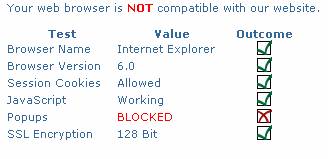
If your browser check fails on Popups, you are using either: |
| |
|
| |
1. |
Pop-up blocking software |
| |
2. |
Browser with built in pop-up blocking software |
| |
|
|
| |
|
The Bill Pay application utilizes enhanced features and tools which call for a separate window to open. Disallowing pop-up windows to occur while using the Bill Pay application may keep certain features from functioning properly. |
| |
|
|
| |
|
Due to the numerous pop-up blocking applications available to the public, we cannot offer specific instructions on turning this feature off, or allowing only your Bill Pay application to open windows. Specific instructions for your pop-up application can be found within it's Help file(s) or by contacting the application's vendor. |